LED Flicker on Camera: Shutter Speed and Banding
Author: Fiat Lux Guides Editorial Team Reviewer: Fiat Lux Guides Editorial Team Most recently reviewed First published Filed under Video Lighting
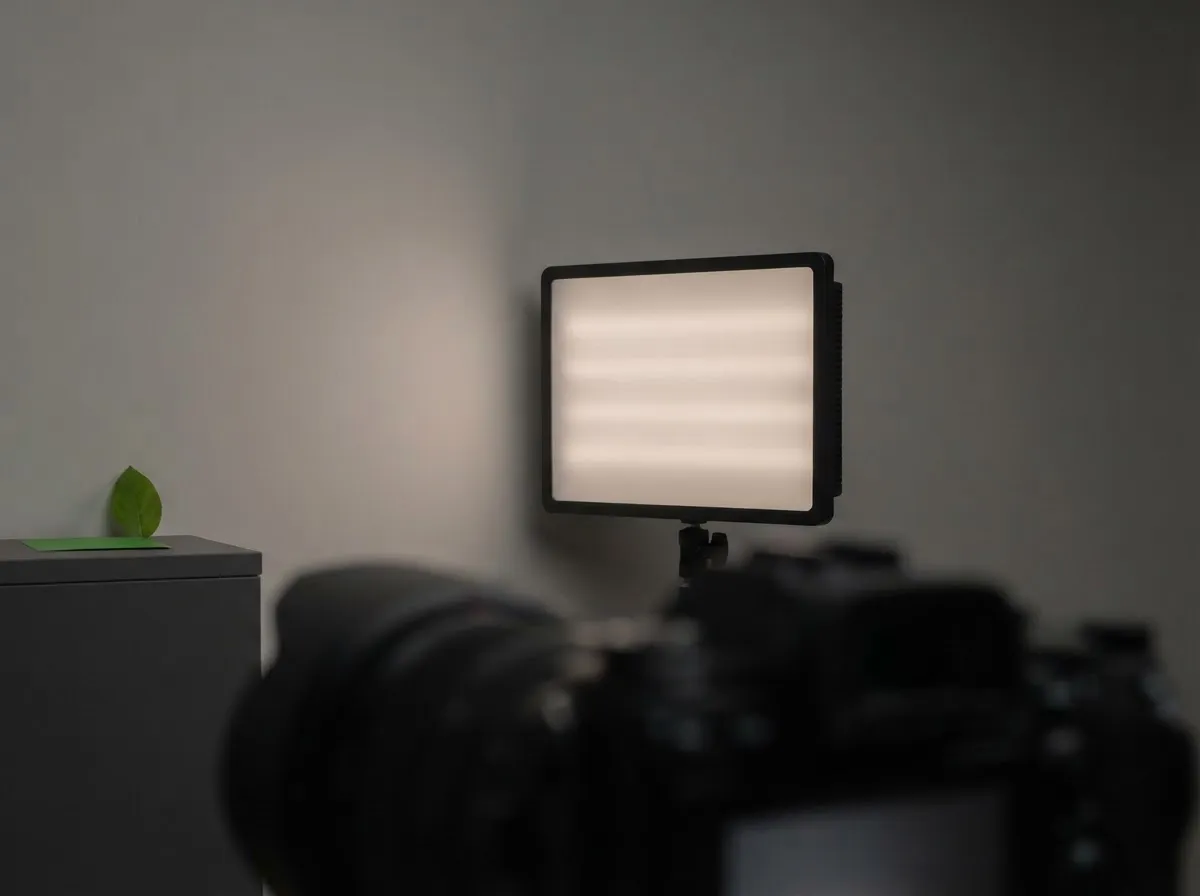
LED flicker and horizontal banding appear on camera when a light pulses faster than your eye can see while a rolling electronic shutter scans the sensor line by line. Matching your shutter speed to an even fraction of the light's cycle—such as 1/50 or 1/100 second in 50 Hz regions, or 1/60 or 1/120 second in 60 Hz regions—or using high-frequency variable shutter tuning removes the bands.
Belongs to the guide: Video Lighting Setup for Calls and YouTube
LED flicker and horizontal banding happen when an artificial light pulses rapidly while your camera scans the image sensor row by row. Within any video lighting setup, spotting and eliminating flicker before you roll is essential because rolling-shutter banding is extremely difficult to fix in editing.
Why LEDs flicker and create horizontal bands
Two separate mechanisms cause flicker on camera:
- Mains-frequency cycling (100 Hz or 120 Hz): Lights powered directly from alternating current rise and fall in brightness twice per AC cycle—100 times per second in 50 Hz regions and 120 times per second in 60 Hz regions.
- Pulse-width modulation (PWM) dimming: Many household LEDs, monitor backlights, and budget video panels dim by switching on and off at hundreds or thousands of hertz. As Sony’s anti-flicker comparison explains, LED lighting and electronic signage often flicker much faster than 100 Hz or 120 Hz.
When your camera uses a rolling electronic shutter—or a focal-plane mechanical shutter at fast speeds—the top of the sensor is exposed slightly earlier than the bottom. If the LED turns dim or off during part of that scan, horizontal bright and dark bands (or color shifts) appear across the frame.
Matching shutter speed to 50 Hz and 60 Hz power

To avoid banding from 100 Hz or 120 Hz sources, choose a shutter speed whose duration spans an exact integer number of light cycles:
- In 60 Hz regions (North America, parts of Asia): Use 1/60 s or 1/120 s (or 1/30 s if motion blur allows).
- In 50 Hz regions (Europe, UK, Australia, much of Asia): Use 1/50 s or 1/100 s (or 1/25 s).
If you shoot 24 fps video in a 60 Hz country at 1/48 s or 1/50 s, you may see slow rolling waves under 120 Hz room lights; switching to 1/60 s (or 1/120 s with an ND filter) aligns the exposure with the 120 Hz cycle. For more on how shutter speed interacts with exposure, see our shutter speed, aperture, ISO, and light guide.
Using camera anti-flicker and variable shutter modes
Standard shutter steps (1/60, 1/125, 1/250) often miss the exact pulse rate of PWM-dimmed LEDs or LED video walls. Modern mirrorless cameras provide two distinct tools for this, as documented by Sony and Canon:
- Standard Anti-Flicker Shooting (100 Hz / 120 Hz only): Designed for still photos with a mechanical shutter, the camera times the shutter release to the peak of the 100 Hz or 120 Hz brightness wave. As Sony’s Help Guide notes, this mode does not detect LEDs flickering faster than 120 Hz and does not work for video.
- High-Resolution Variable Shutter / High-Frequency Anti-Flicker: In Sony’s Var. Shutter and Canon’s High-Frequency Anti-Flicker Shooting, the camera measures flicker across a wide frequency band (Canon lists 50.0 Hz to 8193.7 Hz) and allows fine shutter-speed adjustments (Sony shows a 1/250 setting as 250.6) to reduce banding. Sony’s Var. Shutter works for stills and movies.
Fixing flicker at the light source
Camera settings cannot always solve mixed-frequency scenes where one lamp pulses at 120 Hz and a desk LED pulses at 400 Hz. When possible, fix the light itself:
- Set dimmed LEDs to 100% output: If a fixture dims by PWM, dimming by distance avoids relying on its dimmer. Move the light further back to reduce brightness instead of dimming it electronically, and use our light distance exposure calculator to predict the stop loss.
- Check the fixture’s flicker spec: Look for a maker-stated flicker-free or high-frequency dimming mode; see our continuous LED lights for beginners guide.
- Turn off household room lights: Room bulbs can be an unexpected source of banding; see common lighting mistakes and webcam exposure and white balance settings for quick room checks.
- Safety note: Follow the fixture maker’s manual for power supplies and heat clearance, and consult a licensed electrician for any building wiring or wall-dimmer work.
See our editorial policy for how Fiat Lux Guides documents camera-manual specifications.
Common questions
Why do LED lights flicker on camera when they look steady to the naked eye?
Many LEDs use pulse-width modulation (PWM) to dim brightness, switching on and off hundreds or thousands of times per second—far faster than human vision can resolve. Because a camera's electronic or focal-plane shutter exposes different rows of pixels at slightly different moments, some rows capture the LED while it is on and others while it is off, creating horizontal bands.
What shutter speed stops LED flicker in 60 Hz and 50 Hz countries?
For lights cycling at twice the mains frequency (120 Hz in 60 Hz regions such as North America, or 100 Hz in 50 Hz regions such as Europe), start with shutter speeds that cover full light cycles: 1/60 or 1/120 second in 60 Hz regions, and 1/50 or 1/100 second in 50 Hz regions. If the LED pulses at a non-mains PWM frequency, you will need fine fractional shutter tuning.
Does a mechanical shutter prevent LED banding in still photos?
Not by itself. A focal-plane mechanical shutter still travels across the sensor at fast shutter speeds, so stills can show banding under flickering lights. Sony's Anti-flicker Shoot. mode does require the mechanical shutter, but it only detects 100 Hz or 120 Hz flicker and applies to still images, not movies.
How do Var. Shutter and High-Frequency Anti-Flicker Shooting work?
Both features detect flicker and help you choose a fine-tuned shutter speed instead of a standard step. Sony's Var. Shutter shows the denominator in decimal form (a 1/250 setting appears as 250.6) and works for stills and movies. Canon's High-Frequency Anti-Flicker Shooting detects light sources from 50.0 Hz to 8193.7 Hz and recommends a matching shutter speed.
What if I cannot change my shutter speed because of the 180-degree video rule?
If you are locked to a 24 fps or 30 fps frame rate and cannot adjust shutter speed without changing motion blur, try dimming the light by distance instead of with its dimmer (check the fixture manual for its dimming method), using a fixture whose maker specifies flicker-free operation, or replacing the offending background bulb.
What we checked
- Differences between the [Anti-flicker Shoot.] and [Var. Shutter] functions — Sony Help Guide, checked 2026-11-14 (helpguide.sony.net)
- Anti-flicker Set. (Var. Shutter) — Sony ZV-E10M2 Help Guide, checked 2026-11-14 (helpguide.sony.net)
- High-Frequency Anti-Flicker Shooting — Canon EOS R5 Mark II Manual, checked 2026-11-14 (cam.start.canon)
You might also like
- Video Lighting Setup for Calls and YouTube
Build a clean video lighting setup for calls and YouTube using window light or continuous LEDs, simple angles, distance control, and color matching.
- Green Screen Lighting: Even Backdrop, Clean Key
Light a green screen evenly and separate your subject from the backdrop to eliminate shadows, hotspots, and green spill for clean chroma keying.
- Lighting a Small Home Office for Video
How to light a cramped home office or bedroom desk for sharp, flattering video calls and recordings without bulky stands or wall glare.
- Lighting for Online Teaching and Webinars
Set up comfortable, flicker-free, low-glare lighting for multi-hour online teaching, webinars, and livestreams with steady color.
- Lighting for Talking-Head Videos
Light talking-head and interview videos cleanly with one, two, or three lights by controlling key angle, fill ratio, hair separation, and glare.
- Lighting for Glasses: Avoiding Glare on Camera
Stop glasses glare on camera using the law of reflection: raise and angle your lights, adjust screen brightness, and use anti-reflective lens coatings.